Your document library.
On your Mac.
Some files do not belong in a web upload. PaperMind reads them where they already live, builds its index locally, and answers with citations. Use a local model for an offline workflow, or deliberately connect a cloud model for selected questions.
At a glance
What is PaperMind?
PaperMind is a Mac document-research app that indexes PDFs, Office files, scans, ebooks, notes and source code, then answers questions with citations back to the original material. It supports local models by default and optional providers or connectors configured by the user.
- Platform
- macOS 14 Sonoma or later
- Best for
- Searching and questioning a private multi-file document library with citations
- Processing
- Documents and indexes stay on the Mac in the default local workflow
- Availability
- Release validation; no public purchase endpoint yet
Product facts reviewed against the current application repository on . See the verification method and corrections policy.
Nothing leaves your Mac. Unless you say so.
PaperMind opens files that are already on your computer, indexes them locally, and lets you search or ask questions. No account or analytics SDK is required. With a local model, the workflow stays on the Mac. If you add a cloud-model key, the retrieved passages needed for that question are sent to the provider you chose; the app does not upload the whole source file.
It opens your folder. Then it gets useful.
Point PaperMind at a folder and walk away for a few minutes. It parses everything inside, including the scans. When it comes back, you have a library you can actually talk to.
Drop in a folder
Add a whole folder, sub-folders and all, or single files. PaperMind notices when you add new ones later and quietly catches up.
Search the way you think
Type the exact phrase if you remember it. Type a vague description if you don't. The app runs both at once: BM25 for the words, semantic embeddings for the meaning, and shows you what it found before any AI gets involved.
Answers that cite the page
Every answer points at the source. Click a citation, jump straight to that page in the PDF. No more "trust me, that's in there somewhere."
Local models, if you want
The app ships with a curated catalog: Llama 3.1 8B, Qwen 2.5 7B Instruct and others in GGUF or MLX. They download into your workspace when you pick one. You're never forced to use cloud AI.
Bring your own cloud key
Want Claude or GPT-class answers? Paste your Claude, OpenAI, or OpenRouter key. PaperMind sends only the retrieved passages, not your files. Off by default.
Workspaces that stay separate
One workspace per client, project, or part of your life. Each one has its own library, models and settings. Nothing bleeds across.
Scans, handled
Drop in a scanned PDF or a photo of a page. Apple Vision (the OCR engine already on your Mac) reads it. No Tesseract install, no cloud OCR service, no extra step.
Ask the library, not just a doc
For thematic questions ("what are the recurring themes here?"), PaperMind builds community summaries across your whole library and answers from those. Most tools can't.
Compare two documents
Side-by-side view for when you need to see the diff between contract v1 and v2, or compare two papers in the same field.
If it's a document, it's probably in here.
No conversion step. No "please export to PDF first." Just drop your files in. Office stuff, ebooks, scans, source code, the lot.
.pdf (digital & scanned with OCR)
Word
.docx · .doc
Excel
.xlsx · .xls · .xlsm · .xlsb · .csv
PowerPoint
.pptx · .ppt
Images (OCR)
.png · .jpg · .jpeg · .tiff · .bmp · .webp · .gif · .heic
Text & Markdown
.txt · .md · .markdown · .rst · .rtf
Web
.html · .htm
Structured data
.json · .xml · .yaml · .yml · .toml
Ebooks
.epub
From a folder to a real answer. Without leaving your Mac.
Parsing, chunking, embedding, retrieval, and local-model answers run on your Mac. A network is used only for model downloads or a cloud model you explicitly enable.
Parse
Digital PDFs via pdfium & kreuzberg; scanned via Apple Vision; Office files via python-docx, openpyxl and friends.
Chunk
Content-aware: markdown, semantic, or row-aware table chunking, with token-clamping for the active embedding window.
Embed
Default IBM Granite 97m multilingual via MLX on Apple Silicon. Or pick BGE-Small / Base / M3.
Retrieve
Hybrid BM25 + vector search, with optional knowledge-graph global mode for thematic queries.
Answer
Generate with a local LLM (Llama 3.1, Qwen 2.5, …) or your chosen cloud model. Citations attached.
The repository includes retrieval regression checks used before release. Because the current fixture, query set and scoring method are not yet published as a reproducible benchmark, this page does not present an accuracy percentage or imply that an internal result predicts performance on every document library.
For the people who want to know what's actually running.
No "AI-powered" hand-waving. Every model and library named below is something the app really loads.
| Component | What PaperMind uses |
|---|---|
| Embedding (default) | ibm-granite/granite-embedding-97m-multilingual-r2 · MLX on Apple Silicon |
| Embedding (alternatives) | BAAI/bge-small-en-v1.5, BAAI/bge-base-en-v1.5, BAAI/bge-m3 |
| Local LLMs (curated) | Llama 3.1 8B, Qwen 2.5 7B Instruct, and more · GGUF + MLX |
| Optional cloud LLMs | Claude (Opus / Sonnet / Haiku), OpenAI, OpenRouter — bring your own key |
| Keyword search | Okapi BM25 |
| OCR | Apple Vision via ocrmac (no Tesseract, no cloud OCR) |
| PDF parsing | pdfium + kreuzberg for digital, Apple Vision for scanned |
| Sandbox | Mac App Store sandbox + com.apple.security.network.client for curated model downloads |
| Distribution | Planned Mac App Store build (StoreKit Full Unlock) · planned signed & notarized DMG (Lemon Squeezy licence) |
If you've ever hesitated before uploading a PDF, this is for you.
You know who you are. The work is too sensitive, too voluminous, or both. Pasting it into a chat window isn't an option.
Discovery, without the disclosure.
Case files, contracts, depositions. Indexed on the same Mac that holds them. Answers point at the exact page, so the citation trail is right there.
11 GB of scans. One question.
Birth records, parish registers, century-old census pages. Apple Vision reads the scans on your Mac. Nothing gets uploaded to a transcription service that might be gone in three years.
Your reading list, talking back.
A folder of PDFs and EPUBs you keep meaning to revisit. Ask "what are the recurring themes here" and actually get an answer that spans the whole library, not just the last one you opened.
One workspace per client.
Confidential decks, financials, interview transcripts. Keep each engagement in its own local workspace and use a local model when the material must not be sent to a provider.
The honest comparison.
NotebookLM and ChatPDF are cloud services. LocalRAG keeps work on a mobile device. PaperMind is built for a Mac library and gives you a local-model path as well as optional cloud models. Service limits and prices change, so verify competitors' live plans before deciding. See all comparisons → · vs NotebookLM · vs ChatPDF · vs LocalRAG
| PaperMind | NotebookLM | ChatPDF | LocalRAG | |
|---|---|---|---|---|
| Platform | macOS native — the device where document libraries live | Web (Google Cloud) | Web (cloud) | iPhone · iPad · Android — satellite devices |
| Files leave your device | Not on the local path; retrieved passages go to an optional cloud model only when enabled | Sources are processed by Google | Documents are uploaded to the service | Local processing |
| Local LLM inference | Yes (Llama 3.1, Qwen 2.5, …) | No | No | Yes (Qwen3 4B) |
| Library size practical | Designed for multi-file Mac libraries; performance depends on storage, memory, and models | Plan-dependent source limits | Plan-dependent document limits | Bound by mobile-device storage and memory |
| Formats | PDF, Office, EPUB, images/OCR, text, HTML, and structured data | See current service documentation | Primarily PDF; verify current support | See current app listing |
| OCR | Apple Vision (local) | Limited | Limited | On-device |
| Cited answers | Page-level, click to jump | Inline | Page | Page |
| Knowledge-graph mode | Yes (community summaries) | No | No | No |
| Pricing | Repository plan: free core + $29.99 one-time unlock; not yet a live offer | Free and paid Google plans; see live plan | Free and paid plans; see live plan | See live app listing |
| Account required | No | Yes (Google) | Yes | Optional |
This is the real app, by the way.
These are current product screens from the repository—not fabricated device mockups. They may still change before release.


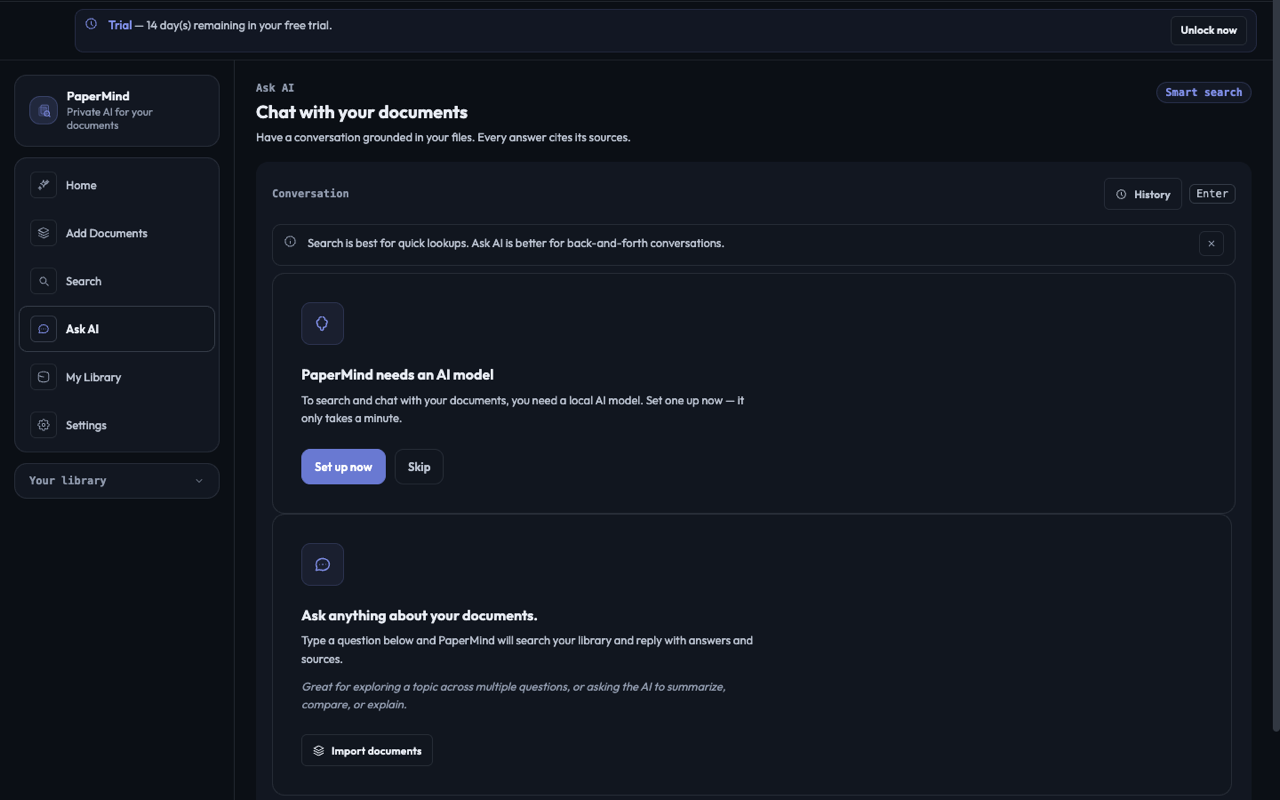
Ask AI with a local Llama / Qwen model.
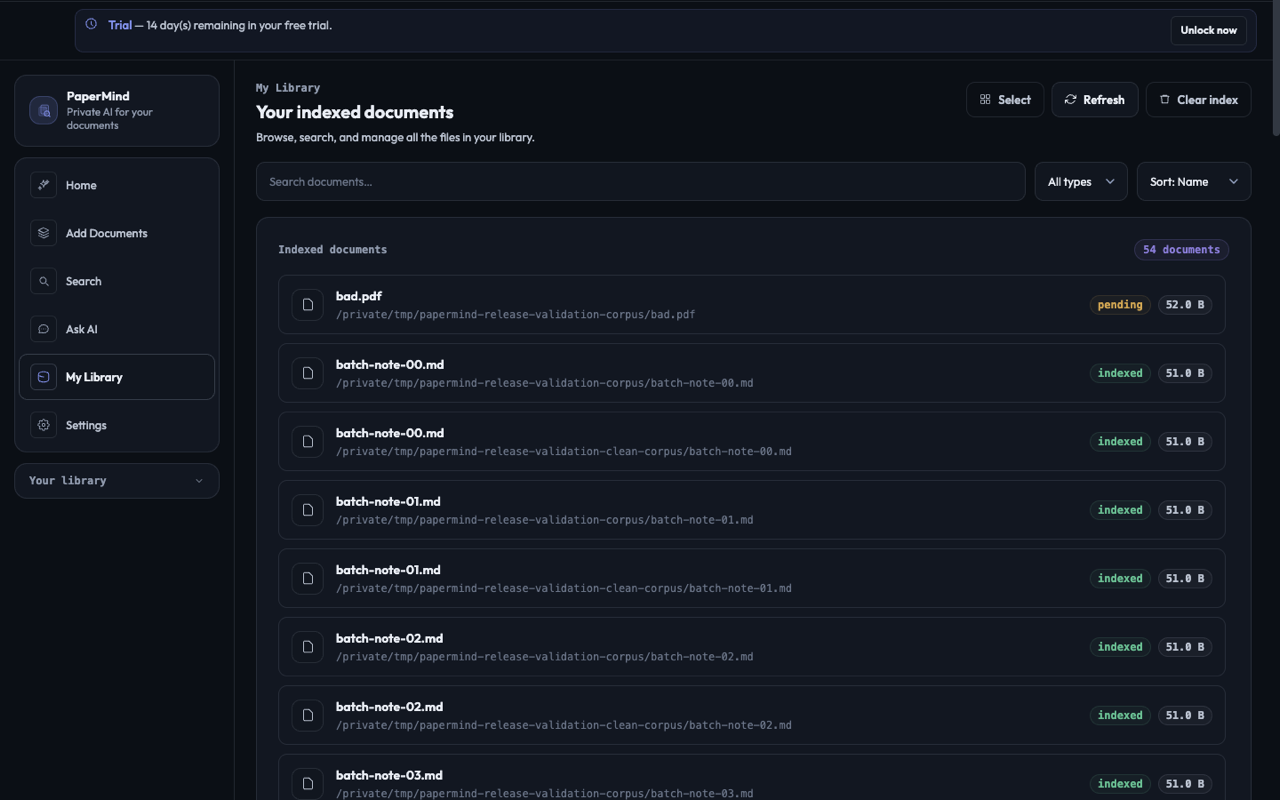
Library view across an indexed workspace.
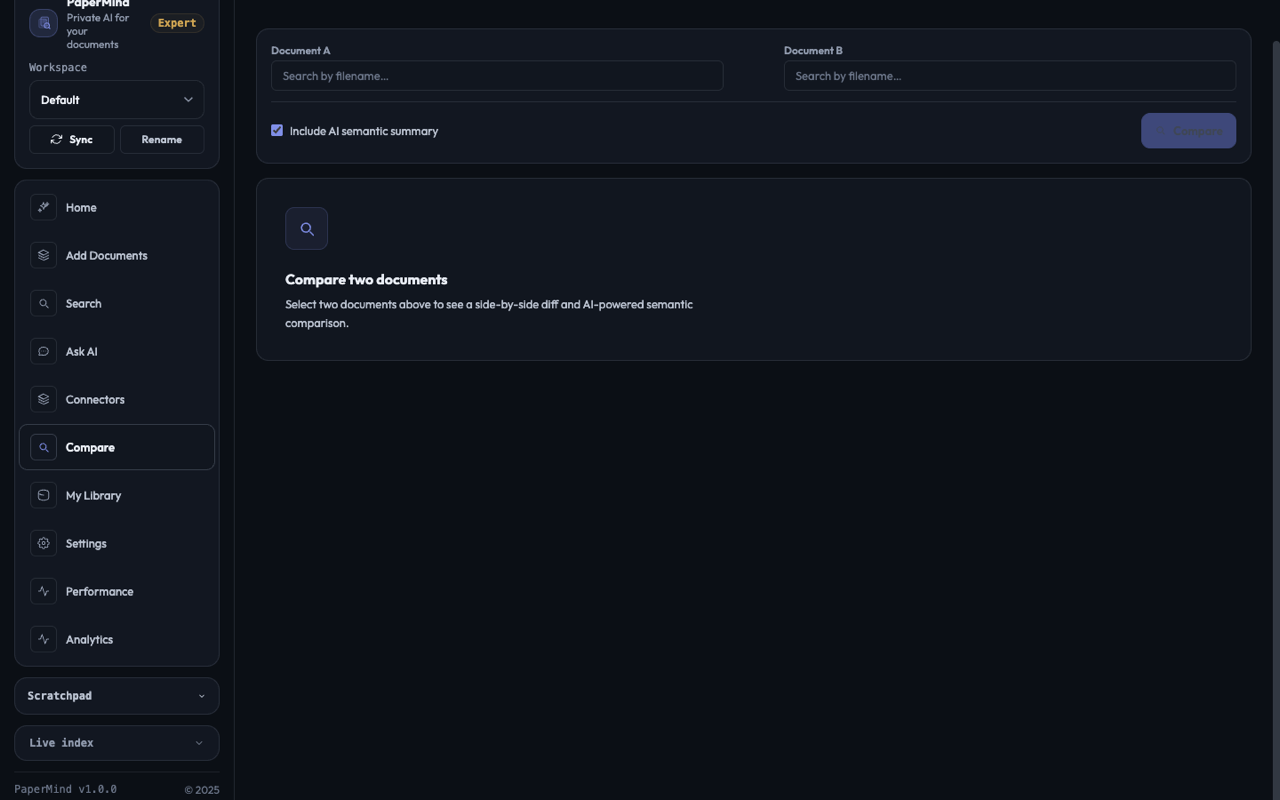
Side-by-side comparison workflow.
Spoiler. It doesn't.
If you want the long version, here it is. Most apps that say "local-first" still phone home for analytics, license checks, or that one little feature they couldn't quite build offline. PaperMind doesn't. Open Little Snitch the first time you launch it and you'll see what we mean.
Straight answers.
The short version: a Mac app for searching and chatting with your own documents, twenty-nine ninety-nine, paid once, never again.
Wait, really no subscription?
That's the current plan in the repository: a free core and a $29.99 one-time Full Unlock. Final storefront price and availability are confirmed on the live purchase sheet at release.
So nothing gets uploaded?
Right. Parsing, OCR, chunking, embedding, and local inference all happen on your Mac. The only way anything leaves is if you plug in a cloud-model API key yourself, and even then it's a few sentences of context per question, not the file.
Which local AI models can I run?
Whatever fits on your Mac. The curated catalog includes Llama 3.1 8B and Qwen 2.5 7B Instruct, plus others, in both GGUF and MLX. You pick one, it downloads into the workspace, you use it.
What about the embedding model?
The default is IBM Granite 97m multilingual, which means non-English documents work out of the box too. If you want to switch to BGE-Small, BGE-Base, or BGE-M3, you can. The library re-indexes when you do.
Does the OCR work well?
It uses Apple's own Vision framework, the same engine the rest of macOS uses for live text in Photos and Preview. It's fast, accurate, and entirely local. No Tesseract install required.
How big can my library get?
The development benchmark covers a substantial multi-document corpus, but there is no universal size promise. Indexing time and local-model performance depend on document mix, free storage, memory, and the Mac you use.
Does it really work offline?
Yes. Once a model is downloaded, you can disconnect the network and everything keeps working: indexing, search, chat. The only times PaperMind touches the internet are when you ask it to download a model or when you've opted into a cloud LLM.
Can I buy it outside the App Store?
A signed, notarized direct build with a Lemon Squeezy licence is planned alongside the App Store build. Neither public purchase link is posted until it has been verified.
Two distribution routes are being prepared.
PaperMind is in release validation. We will publish the App Store listing and the signed direct build only after each endpoint is live and checked.
Full Unlock
No subscription or account is planned. The live purchase sheet will control final price and terms.